GrabGPU vs Silicon Analysts' Cloud GPU Pricing Tracker: Stop Pricing GPUs You Can't Rent
· comparison
The price was fine. The card wasn’t there.
You’ve probably done this. You find a good H100 rate on a comparison table and open the provider’s console to rent it. Then you get a waitlist, a “contact sales” form, or a region with nothing left. A price table only tells you what a card costs. It doesn’t tell you whether you can rent one today, and finding that out costs you time on every project.
This post compares two ways to check before you commit: Silicon Analysts’ Cloud GPU Pricing Tracker and GrabGPU.
What Silicon Analysts gives you
Silicon Analysts is a solid reference for big-cloud pricing. Its tracker covers AWS, Azure, GCP, CoreWeave, Lambda, RunPod and Crusoe, with filters for H100 SXM5, H200, B200, B300, TPU v5p, TPU Trillium and MI300X. The pricing matrix has On-Demand, Spot and Cap. Block columns, and a separate table shows spot and reserved discounts by provider. If you’re planning a long hyperscaler contract or a TPU budget, bookmark it.
It shows availability too, as a status column with the labels “available,” “limited” and “waitlist”. The page carries a last-updated date but no general refresh schedule for the tracker. Its footer says: “All data is sourced exclusively from public filings, press releases, and published industry reports.”
That approach works for contract planning. It doesn’t help much when you need a card running this afternoon.
What GrabGPU gives you
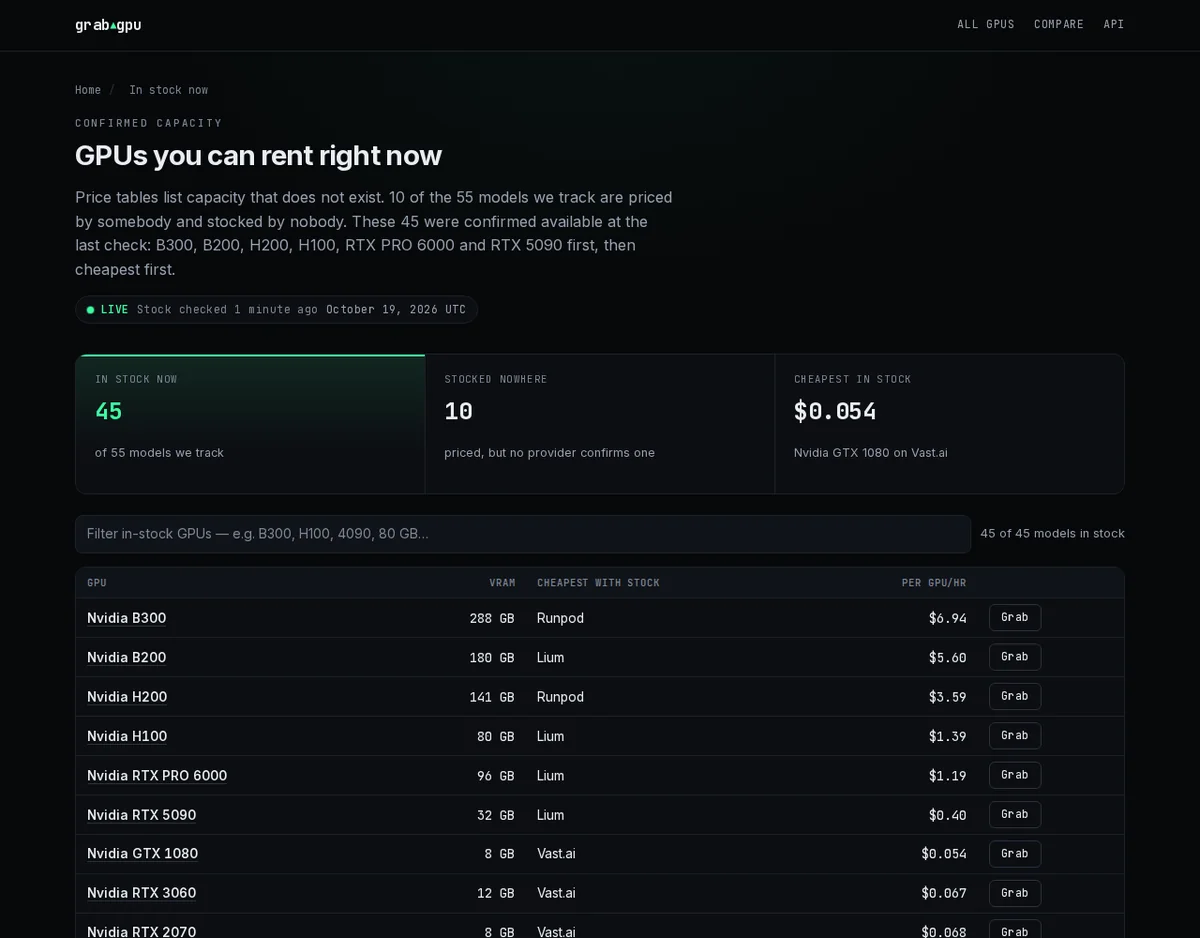
GrabGPU is built for the ML engineer who already knows the price and needs to know whether the card can be rented.
- Stock comes with every price. In the site’s words, “Every row carries the stock the provider reported at our last check”. The in-stock page ranks only capacity confirmed available, cheapest first.
- Data from the providers themselves. Prices come from five public APIs (Shadeform, Vast.ai, RunPod, Lium and QuantaCloud), never from another comparison site. One piece of our code decides what “cheapest” and “in stock” mean. If a source fails, we log it and skip it, so the rest of the site stays up.
- Fresh data. The GrabGPU homepage describes its data as “The same snapshot the pages render, refreshed every hour.”
- On-demand prices up front. Spot prices never headline a page. A spot instance can be taken back mid-run, so it isn’t the same product as an on-demand hour. Leading with spot makes every card look cheaper than you can actually rent it.
- Free JSON, no key. /api/best-deals.json and /api/gpus.json give you the snapshot directly, and every offer includes a
rent_url. There’s also a plain-text/llms.txtfor AI assistants.
Head to head
- Main question it answers: Silicon Analysts shows what the big clouds charge, by contract type. GrabGPU shows which GPUs you can rent right now, and the cheapest place to rent each one.
- Providers: Silicon Analysts covers hyperscalers and large clouds. GrabGPU covers neoclouds and marketplaces such as Runpod, Lium, Vast.ai, Massed Compute, Denvr Dataworks, Lambda Labs and Paperspace, as listed on grabgpu.com.
- Freshness: Silicon Analysts shows a last-updated date and no stated refresh schedule. GrabGPU says its snapshot is “refreshed every hour”.
- Stock: Silicon Analysts gives each instance a status label. GrabGPU attaches the provider’s reported stock to every price, and its in-stock page lists only confirmed capacity.
- Sources: Silicon Analysts uses public filings, press releases and industry reports. GrabGPU reads the providers’ own public APIs.
- Contract terms: Silicon Analysts covers reserved, spot and capacity-block pricing. GrabGPU focuses on on-demand hours you can rent today.
- Getting the data: Silicon Analysts links to a developer page. GrabGPU has free JSON endpoints with no key, with a rent link on every offer.
Prices move every day. A static table doesn’t.
The cheapest rate for a card shifts as providers fill up and free up capacity. We track that from our own snapshots:
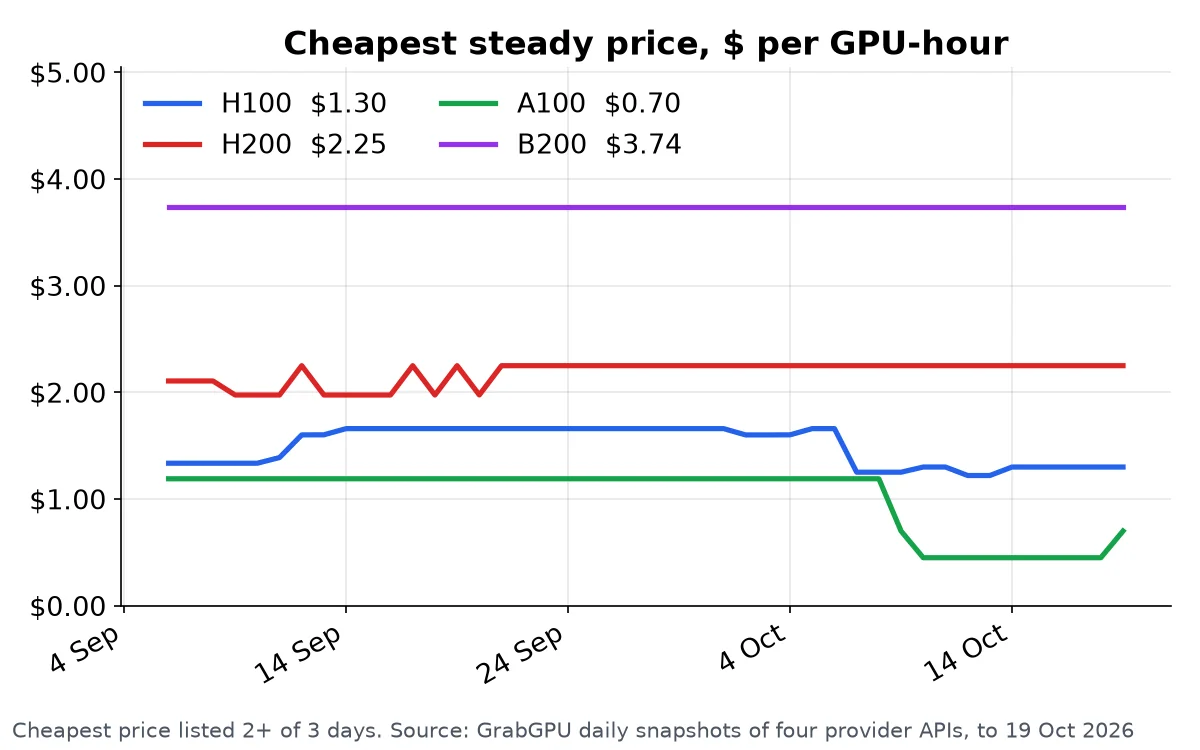
Over a long training run, the gap between the cheapest provider and a typical one adds up to real money. GrabGPU shows every provider for each model on one page, with stock next to each price and a Grab button that takes you straight to the provider. When the cheap capacity runs out, you see that too, before you’ve wasted an afternoon on signup forms.
Which one should you open?
If you’re negotiating a multi-year reservation with AWS or pricing TPUs, Silicon Analysts is the more useful reference.
If you need a GPU running today, use GrabGPU. Every price comes with the stock the provider reported, and the cheapest capacity tends to go first. While you check consoles one by one, someone else can rent the card.
Find a GPU you can rent right now
Open GrabGPU and see what’s in stock now →
Some provider links on GrabGPU are referral links and may earn us a commission at no cost to you. Prices move hourly, so confirm on the provider’s site before you rent.